- الصفحة الرئيسية /
- إلكترونيات /
- ملحقات أجهزة الكمبيوتر /
- مكونات الكمبيوتر /
- Single Board Computers /
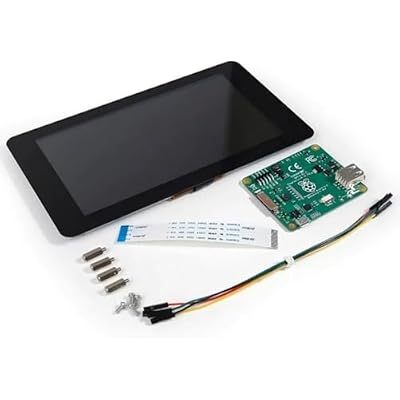
- شاشه شامل من التوت بي 7
0 ratings

منتج #:
2843288
شاشه شامل من التوت بي 7
منتج #:
2843288
EGP 5596
Price Details
Excluding Shipping & Custom charges ( Shipping and custom charges will be calculated on checkout )
*All items will import from أمريكا
0 ratings
اكتب رأيك
متوفر فى المخزون
 مستورد من متجر USA
كمية:
اطلب الآن واحصل عليه حول الإثنين, يوليو 06
معاملة آمنة
تعمل يوباي جاهدة لحماية أمنك وخصوصيتك. يضمن نظام أمان الدفع المتقدم لدينا السرية من خلال تشفير معلوماتك أثناء النقل باستخدام بروتوكولات AES (معايير التشفير المتقدمة) وSSL (طبقة المنافذ الآمنة). تفاصيل الدفع الخاصة بك آمنة بنسبة %100 لأننا لا نشارك تفاصيل الدفع الخاصة بك مع بائعين تابعين لجهات خارجية
أفضل شركائنا اللوجستيين


شحن
سريع

استرجاع
مجاني*

تغليف أمن

منتجات أصلية %100

PCI DSS Compliance

ISO 27001 Certified


Note: Step Down Voltage Transformer required for using electronics products of أمريكا store (110-120). Recommended power converters اشتري الآن.


مايفيد
القدرة على اللمس
يوفر واجهة لمس سريعة الاستجابة ، مما يعزز تفاعل المستخدم للمشاريع ، مما يجعله مثاليًا لعشاق الأعمال اليدوية والمعلمين الذين يتطلعون إلى إنشاء تطبيقات جذابة.
تصميم مدمج
تتميز هذه الشاشة خفيفة الوزن ومحمولة، وتتناسب بسلاسة مع مشاريع Raspberry Pi، مما يوفر المرونة للتطبيقات المنزلية أو أثناء التنقل دون المساس بالمساحة.
قرار عالي
مع دقة 800 × 480 بكسل ، فإنه يوفر صورًا نابضة بالحياة ، ومثالية لعرض المعلومات والرسومات التفصيلية ، مما يرفع تجربة المستخدم الإجمالية للمشاريع الرقمية.
تفاصيل المنتج
| وزن العنصر | 1.03 رطل (470 جرام) |
من يجب أن يشتري؟

-
عشاق الأعمال اليدوية
مثالي للهواة الذين يقومون بإنشاء مشاريع Raspberry Pi التي تتطلب شاشة تفاعلية لإدخال المستخدم.
-
قطاع التعليم
مثالية للمعلمين والطلاب المشاركين في دورات البرمجة والإلكترونيات، وتعزيز خبرات التعلم من خلال التفاعل باللمس.
-
التطبيقات المحمولة
ممتاز للمطورين الذين يبنون أجهزة محمولة تتطلب واجهة شاشة تعمل باللمس مدمجة للملاحة والتحكم.

-
المستخدمون المهتمون بالميزانية
غير مناسب للأفراد الذين يبحثون عن خيارات عرض منخفضة التكلفة، لأنه قد يكون أغلى من البدائل التي لا تعمل باللمس.
-
احتياجات عالية الأداء
ليست مثالية للمستخدمين الذين يحتاجون إلى شاشات عالية الدقة أو إمكانات رسومات متقدمة تتجاوز إخراج Raspberry Pi القياسي.
-
مهارات فنية محدودة
قد لا يناسب المستخدمين الذين يفتقرون إلى المهارات التقنية الأساسية، حيث يتطلب الإعداد والتكامل الإلمام بأنظمة Raspberry Pi.
وصف المنتج
شاشه شامل من التوت بي 7
About This Item
Introducing the Raspberry Pi 7" Touch Screen Display - the perfect companion for your Raspberry Pi projects. Featuring a vibrant 7-inch touch screen, this display lets you interact with your Raspberry Pi in an intuitive and convenient way. Whether you're navigating menus, browsing the web, or playing games, the responsive touch screen ensures a seamless user experience. The Raspberry Pi 7" Touch Screen Display is easy to set up.
Simply connect it to your Raspberry Pi using the included ribbon cable, and you're ready to go. The display's compact size makes it ideal for projects that require portability, and its high-resolution display delivers crisp visuals, making images and text appear sharp and vibrant. With its versatile design, the Raspberry Pi 7" Touch Screen Display can be used for a wide range of applications. From creating a multimedia center to building a smart home dashboard, the possibilities are endless.
Use it to display weather information, control your smart devices, or even showcase your digital photo collection. The Raspberry Pi 7" Touch Screen Display is not only functional but also aesthetically pleasing. Its sleek, black frame seamlessly complements any Raspberry Pi setup, adding a modern touch to your project. Upgrade your Raspberry Pi experience with the Raspberry Pi 7" Touch Screen Display. Order yours today and take your projects to the next level.
هل لديك أي استفسار؟ تحدث معنا
أسئلة وأجوبة العملاء
-
سؤال:
What is the Raspberry Pi 7 Touch Screen Display used for?
إجابه: The Raspberry Pi 7 Touch Screen Display is primarily used as an interface for Raspberry Pi projects. It allows users to interact with their Raspberry Pi in a more intuitive way, ideal for applications that require user input or real-time data visualization. Whether you're building a media center, a home automation system, or a simple educational project, the touchscreen feature enhances user engagement by providing direct interaction. This makes it perfect for DIY enthusiasts and developers looking to create innovative solutions. -
سؤال:
هل شاشة اللمس Raspberry Pi 7 متوافقة مع جميع موديلات Raspberry Pi؟
إجابه: The Raspberry Pi 7 Touch Screen Display is specifically designed to work with Raspberry Pi models that have a 40-pin GPIO connector, which includes Raspberry Pi 2, 3, and 4. Understanding compatibility is crucial, as it ensures that you can harness the display’s full potential. Before setting up your project, always check your Raspberry Pi model to confirm compatibility, especially if you're using older models which may not support all the display functionalities. -
سؤال:
كيف أقوم بتوصيل شاشة اللمس Raspberry Pi 7 بجهاز Raspberry Pi الخاص بي؟
إجابه: To connect the Raspberry Pi 7 Touch Screen Display, simply plug the 40-pin connector into the GPIO pins on your Raspberry Pi. Be sure to secure the display with the provided screws to ensure stability. This connection not only allows the touchscreen to function but also powers the display through the Raspberry Pi, simplifying the setup process. It’s a straightforward method that is ideal for users who want a clean and efficient workspace for their Raspberry Pi projects. -
سؤال:
ما هي أنظمة التشغيل التي تدعم شاشة اللمس Raspberry Pi 7؟
إجابه: The Raspberry Pi 7 Touch Screen Display is compatible with several operating systems designed for Raspberry Pi, including Raspbian, Ubuntu Mate, and others that support touchscreen functionality. Each operating system may have specific drivers or settings that enhance the touch capabilities. Therefore, it's advisable to choose an OS that suits your application needs. For users creating educational tools or interactive kiosks, selecting the right OS can dramatically improve the responsiveness and user experience. -
سؤال:
هل يمكنني استخدام شاشة اللمس Raspberry Pi 7 للألعاب؟
إجابه: Yes, you can use the Raspberry Pi 7 Touch Screen Display for gaming, especially for retro gaming emulators like RetroPie. The display's responsive touch capability and vibrant visuals create an engaging gaming experience. While not all games are optimized for touchscreen controls, many casual games and emulators have support for such interactions, making it a great addition for hobbyist gaming setups. If you’re looking to create an interactive gaming console, this display is an excellent choice. -
سؤال:
ما هي المشاريع التي يمكنني بناؤها باستخدام شاشة اللمس Raspberry Pi 7؟
إجابه: There are countless projects you can create with the Raspberry Pi 7 Touch Screen Display, including home automation dashboards, digital photo frames, and interactive educational tools. This versatility allows you to explore various applications, from programming simple games to controlling smart home devices. Additionally, incorporating this display into a project can significantly improve user interaction, making the project not only functional but also visually appealing, perfect for showcasing your skills. -
سؤال:
هل تأتي شاشة Raspberry Pi 7 التي تعمل باللمس مع حامل؟
إجابه: Typically, the Raspberry Pi 7 Touch Screen Display does not come with a stand included in the package. However, many users opt to purchase a compatible stand or use DIY solutions to mount the display securely. The choice of stand can enhance the usability of the touchscreen, especially in scenarios where visibility and accessibility are key, like in a kiosk or a home setup. Look for options that provide stability while complementing your project aesthetics. -
سؤال:
Can multiple Raspberry Pi 7 Touch Screen Displays be used simultaneously?
إجابه: Using multiple Raspberry Pi 7 Touch Screen Displays simultaneously on a single Raspberry Pi is not supported, as the default graphical interface can only output to one display at a time. However, users can switch between different displays or utilize different Raspberry Pi units for separate projects. This limitation is important to consider when planning projects that require multiple display outputs, such as collaborative installations or multi-user systems. -
سؤال:
How do I calibrate the touchscreen on the Raspberry Pi 7 Touch Screen Display?
إجابه: تتضمن معايرة شاشة اللمس الموجودة على شاشة Raspberry Pi 7 التي تعمل باللمس عادةً استخدام أدوات المعايرة المتوفرة داخل نظام التشغيل. على سبيل المثال، يمكنك استخدام أوامر مثل "xinput" في Raspbian لضبط الإعدادات. تعد المعايرة أمرًا بالغ الأهمية لضمان استجابات اللمس الدقيقة، خاصة إذا كنت تستخدم تطبيقات دقيقة. تعمل المعايرة المناسبة على تحسين تجربة المستخدم، خاصة في التطبيقات التي تتطلب مدخلات لمس دقيقة أو تفاعلات مفصلة. -
سؤال:
Where can I buy the Raspberry Pi 7 Touch Screen Display in Egypt?
إجابه: You can buy the Raspberry Pi 7 Touch Screen Display from Ubuy, a trusted e-commerce platform that offers a wide variety of tech products. Ubuy ensures that you have access to the latest models and accessories for your projects, providing a straightforward purchasing experience. This makes it a reliable choice for enthusiasts and developers looking to find the best equipment for their Raspberry Pi projects.
RaspberryPi Single Board Computers مراجعة تحريرية
لم يتم العثور على مراجعات تحريرية
مراجعات العملاء وتقييماتهم
1 تقييمات العملاء
-
5 نجمة
100%
-
4 نجمة
0%
-
3 نجمة
0%
-
2 نجمة
0%
-
1 نجمة
0%
أضف تقييم لهذا المنتج
شارك أفكارك مع عملاء آخرين
تاريخ سعر المنتج
معلومات مهمة
- القيود: بالنسبة للمنتجات التي يتم شحنها دولياً، يُرجى ملاحظة أن أي ضمان من الشركة المصنعة قد لا يكون صالحاً؛ قد لا تتوفر خيارات خدمة الشركة المصنعة؛ قد لا تكون أدلة المنتج والتعليمات وتحذيرات السلامة مكتوبة بلغة بلد المقصد؛ قد لا يتم تصميم المنتجات (والمواد المصاحبة لها) وفقاً لمعايير بلد الوجهة والمواصفات ومتطلبات الملصقات؛ وقد لا تتوافق المنتجات مع الجهد الكهربي المستخدم في بلد الوجهة والمعايير الكهربائية الأخرى (تتطلب استخدام محوّل كهربي أو جهاز تحويل إذا كان ذلك مناسباً). المستلم مسؤول عن ضمان إمكانية استيراد المنتج بشكل قانوني إلى بلد الوجهة. عند الطلب من يوباي أو الشركات التابعة لها، يكون المستلم هو المستورد المسجل ويجب أن يلتزم بجميع القوانين واللوائح الخاصة ببلد الوجهة.
- ليست كل المنتجات المدرجة على يوباي معروضة للبيع، لأن يوباي هو محرك بحث عالمي. المنتجات تخضع للوائح التصدير / التجارة.
EGP 5596
اطلب الآن واحصل عليه حول الإثنين, يوليو 06
هذا المنتج غير ممنوع في بلدي. (الرجاء الضغط على الرابط أعلاه إذا لم يكن هذا المنتج ممنوعاً في بلدك ، لذلك سيقوم فريقنا بمراجعته والسماح به.)
كمية:
معاملة آمنة
تعمل يوباي جاهدة لحماية أمنك وخصوصيتك. يضمن نظام أمان الدفع المتقدم لدينا السرية من خلال تشفير معلوماتك أثناء النقل باستخدام بروتوكولات AES (معايير التشفير المتقدمة) وSSL (طبقة المنافذ الآمنة). تفاصيل الدفع الخاصة بك آمنة بنسبة %100 لأننا لا نشارك تفاصيل الدفع الخاصة بك مع بائعين تابعين لجهات خارجية
أفضل شركائنا اللوجستيين
أسرع توصيل عبر الحدود